On Saturday, January 24, 2015, Chris had the privilege to present on behalf of You3Dit Inc to the Ventura County Office of Education and their newly credentialed K12 teaching staff. Competing with about 7 other seminars at the same time, we packed Salon B with about 60x educators who were eager to learn more about digital fabrication technologies like 3D printing, laser cutting and desktop CNC. In addition, Chris also presented on the Rapid Innovation Cycle (as developed by Hands-on Rapid Innovation) as a method for driving linked- and project-based learning activities for students. This process enables students to quickly develop market tests where prototypes are preferred over ideas and data generated from real market feedback helps drive the business decisions in both entrepreneurial and educational environments. A HUGE THANKS goes out to Mr. Mark Urwick, Robert Hochberg and Jacquelyn Lozano for all their help and facilitation throughout the day. VCOE Technology Integration Session Details Presented by Dr. Chris D.
Here is the PDF link to the Common 3D Printing Failures and How to Fight Against Them talk by Chris McCoy at the World Maker Faire in New York on September 20, 2014: 140919-common-3D-printing-failures-wmf-2014-NYC-v02 Did you not receive a “Wedgie” at the talk? Download and print your own today!! http://www.bit.ly/wedgieSTL Here’s a link to Chris’s presentation information. In this article, I hope to give everyone general strategies to resolve the following issues (mainly for FFF-style 3D printers): Part delamination from build plate Mis-registration in your x and y axes Many extruder issues (clogging in nozzle, clogging in feeder, filament breakage, filament tangling, poor extrusion, inconsistent extrusion, etc.) Part warping Frozen or stalled 3D prints First layer issues Risks of leaving your printer alone (filament jams, tangled filament, etc.) Bed leveling common pitfalls Saving a print that’s had issues Overall, these problems are an artifact of early-adopter-version 3D printers. Manufacturers of these machines are now very aware of some of these issues
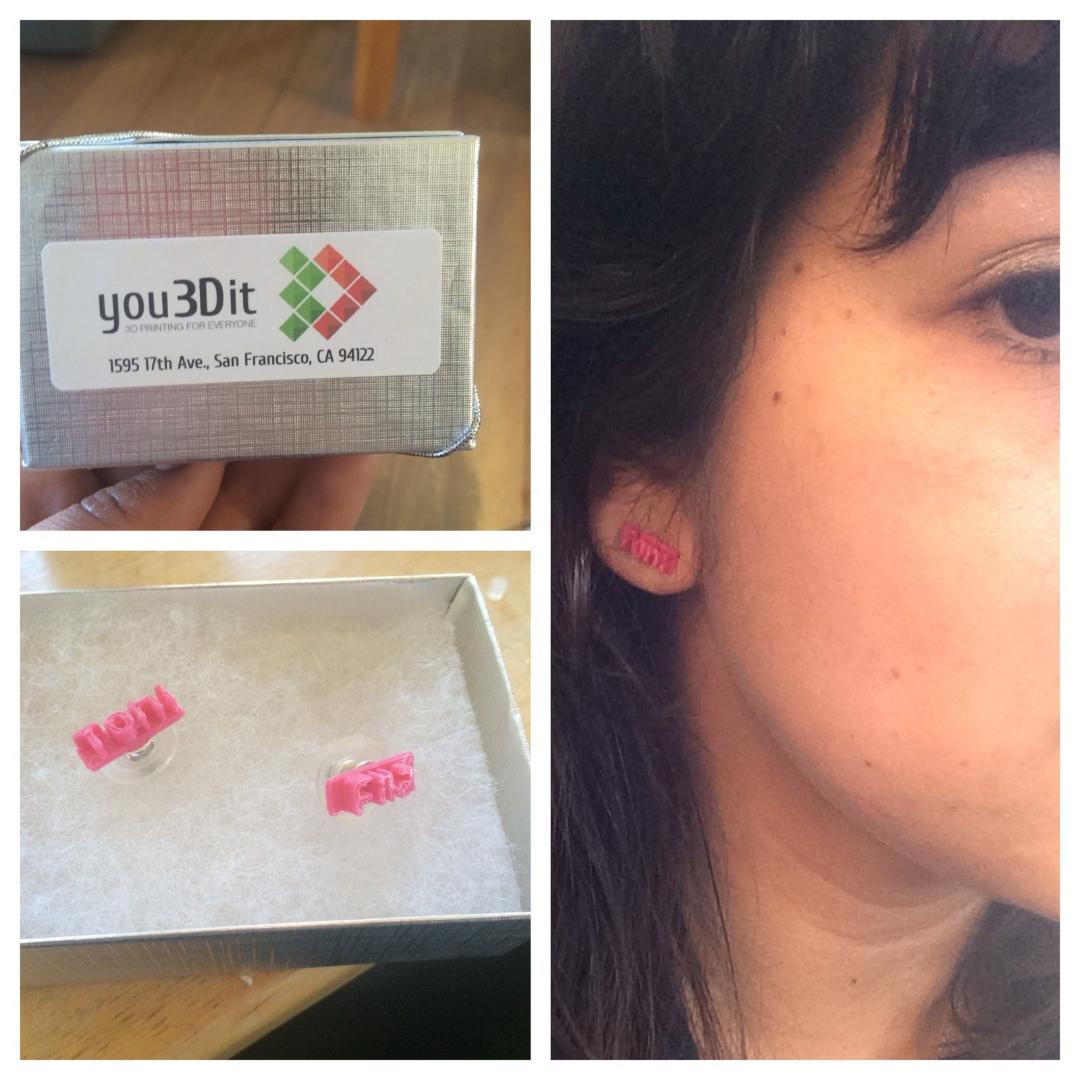
Preschool teacher Kate Brehob is wonderful with kids. Everyone who has met her knows this. What we didn’t know–possibly herself included–is that she can also design sweet customized jewelry that is ready to 3D print.
Showing how her new personalized earrings will look.
The back story:
My cousin is naming her second baby for my grandmother. She named her first child after her mom so now there is going to be a new generation of sisters with these same names. I thought it was such a sweet idea and I wanted to give her something she wouldn’t find anywhere else that also had meaning. I decided to create stud earrings with each daughter’s name on them. I also thought they would be cute as stud earrings because both names have four letters each. The next step was just to figure out how to get tiny custom stud shaped names!
-Katherine, San Francisco, CA
Using TinkerCAD–an entry-level computer-aided-design (CAD) software–and the You3Dit network, Katherine was able to quickly able to make the earring parts which she then cemented to blank, earring studs. We sent her this CAD tutorial from Hands-on Rapid Innovation to help her get started.
“TinkerCAD was pretty easy to use, but I’m not used to working in millimeters” said Brehob. Most engineers and scientists prefer the metric system and regularly push using these units (as demonstrated in TinkerCAD), however, people living in the U.S. are typically more familiar with the inch, pound and quart units of measurement. Thus, if you’re struggling to figure out the size / scale of your project, consider downloading and printing one of these “to-scale” rulers. Additionally, we worked with Ms. Brehob to tweak the z-dimension height so that the earrings came out a just the right thickness so simply work with your designers.
“The first set turned out pretty good, but I think I’m going to add hearts or something to hide the backing of the stud” said the preschool teacher. This observation was made after she had received the first set of prints. “This is exactly the benefit of quick & easy access to rapid prototyping tools like 3D printers” said Chris McCoy, co-founder of You3Dit. “3D printers unlock creativity via rapid iteration” which allows for faster convergence on final solutions and allows the mind to explore many solutions without a lot of cost (time, money, effort).
3D printers are not the end-all, be-all solution for everything–we know this. But if you show people their potential and how easy it is to get started, people can start to see their real value beyond just a mini widget factory. Since people are not yet used to having extreme personalization in their lives, they don’t add 3D printing to their solution set for problems. This is one of You3Dit’s main goals: highlighting the potential of desktop manufacturing, educating people about how the technology works and then, providing people access to these machines that can help bring their ideas to life.
Hello You3Dit and 3D printing fans! While it may seem like You3Dit died online, I can tell you personally that we’re more alive than ever and are very excited about what is in store for 2014. We’re most excited about you–the community–which continues to grow! Today we have 3D printers in over 14 different countries and designers in over 20. Each and every one of you has an interesting reason for getting involved and we look forward to engaging you much more in the future. Here’s what’s on deck for You3Dit: An all new website – beginning Summer 2014 we will have an all new website that will better allow you to manage your jobs, post your incredible work and promote your skills. New business coming your way – although we cannot say exactly how, there will be business flowing your way via several targeted means at encouraging people to start personalizing, fixing and prototyping their ideas. We’re hiring! –
We just added a blog to our site! We hope to share with you interesting and useful things in the world of 3D printing and distributed manufacturing! ~Team You3Dit

 You3Dit.com Blog